If you don't like this automatic action, you can disable this autoplay/autorun function.
For non-Home versions of Windows (for example, Windows XP Professional, Vista Ultimate):
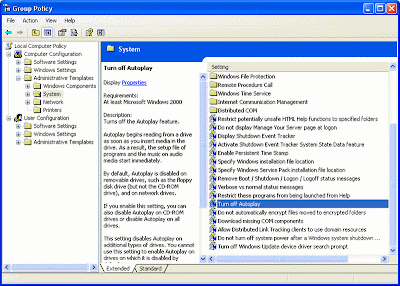
- Click Start, click Run, enter gpedit.msc (launch Group Policy Editor);
- XP users: Open Computer Configuration | Administrative Templates | System, Vista users: Open Computer Configuration | Windows Components | AutoPlay Policies;
- Find Turn Off AutoPlay in the right-hand pane and double-click it;
- Choose Enabled and set it for All drives.
Or, in any Windows version:
- Launch the Registry editor (Start | Run | regedit);
- Navigate to HKEY_CURRENT_USER\Software\Microsoft\Windows\CurrentVersion\Policies\Explorer;
- Double-click NoDriveTypeAutoRun in the right-hand pane and set its value to hexadecimal FF.
No comments:
Post a Comment