Tips & Tricks, Tutorials, Hacking, Troubleshooting,

Showing posts with label Mobile Tips. Show all posts

Nokia Lumia 900 is an amazing Windows Phone smartphone packed with a beautiful polycarbonate unibody design, features a 4.3” AMOLED ClearBlack touchscreen display, powered by a 1.4 GHz processor, 512MB RAM, 8MP rear Camera with Carl Zeiss optics and dual LED flash, 1MP front camera, a non-removable battery of 1830mAh, 4G LTE, and more. Nokia 900 looks highly similar to Lumia 800 and N9, however it’s considerably bigger than these two and the way to insert SIM in it is bit different as well.

Just like iPhone, Nokia Lumia 900 uses a Micro SIM (mini-UICC card) which is certainly smaller in size than the standard SIM card and the way to insert SIM corresponds with iPhone. So, let’s see how to insert or change the Micro SIM card on Lumia 900 -
1. Take out the SIM door key that comes within the package to unlock the SIM tray. You can also use a paper clip if the SIM eject tool is misplaced.
2. Turn Off your phone.
3. Look for the SIM door on the top side of phone as shown below.
sim door_nokia-lumia-900
4. Insert the SIM door key into the SIM door hole and push until the SIM tray pops out. Then pull the tray out.
insert-simcard_lumia-900
5. Put your Micro SIM card in the SIM tray and make sure the golden contact area of SIM is faced upwards. (Refer to image below)
sim-card-tray_lumia-900
6. Push the SIM tray back into your phone in same manner until it locks into place.
insert-micro-sim_lumia-900
Now turn on your Lumia 900 and it should recognize the SIM. :)
~ People with a standard SIM card can cut it into a Micro SIM either manually or using a SIM card cutter. You can also ask your carrier to do the needful.

NOKIA ::.Universal Codes
Code Description :
These Nokia codes will work on most Nokia Mobile Phones
(1) *3370# Activate Enhanced Full Rate Codec (EFR) - Your phone uses the best sound quality but talk time is reduced by approx. 5%
(2) #3370# Deactivate Enhanced Full Rate Codec (EFR) OR *3370# ( Favourite )
(3) *#4720# Activate Half Rate Codec - Your phone uses a lower quality sound but you should gain approx 30% more Talk Time.
(4) *#4720# Deactivate Half Rate Codec.
5) *#0000# Displays your phones software version, 1st Line : Software Version, 2nd Line : Software Release Date, 3rd Line : Compression Type. ( Favourite )
(6) *#9999# Phones software version if *#0000# does not work.
(7) *#06# For checking the International Mobile Equipment Identity (IMEI Number). ( Favourite )
(

#pw+1234567890+ 1# Provider Lock Status. (use the "*" button to obtain the "p,w" and "+" symbols).
(9) #pw+1234567890+ 2# Network Lock Status. (use the "*" button to obtain the "p,w" and "+" symbols).
(10) #pw+1234567890+ 3# Country Lock Status. (use the "*" button to obtain the "p,w" and "+" symbols).
(11) #pw+1234567890+ 4# SIM Card Lock Status. (use the "*" button to obtain the "p,w" and "+" symbols).
(12) *#147# (vodafone) this lets you know who called you last.
(13) *#1471# Last call (Only vodofone).
(14) *#21# Allows you to check the number that "All Calls" are diverted to
(15) *#2640# Displays security code in use.
(16) *#30# Lets you see the private number.
(17) *#43# Allows you to check the "Call Waiting" status of your phone.
(1

*#61# Allows you to check the number that "On No Reply" calls are diverted to.
(19) *#62# Allows you to check the number that "Divert If Unreachable (no service)" calls are diverted to.
(20) *#67# Allows you to check the number that "On Busy Calls" are diverted to.
(21) *#67705646# Removes operator logo on 3310 & 3330.
(22) *#73# Reset phone timers and game scores.
(23) *#746025625# Displays the SIM Clock status, if your phone supports this power saving feature "SIM Clock Stop Allowed", it means you will get the best standby time possible.
24) *#7760# Manufactures code.
(25) *#7780# Restore factory settings.
26) *#8110# Software version for the nokia 8110.
(27) *#92702689# Displays - 1.Serial Number, 2.Date Made, 3.Purchase Date, 4.Date of last repair
(0000 for no repairs), 5.Transfer User Data. To exit this mode you need to switch your phone off then on again. (Favourite )
(2

*#94870345123456789 # Deactivate the PWM-Mem.
(29) **21*number# Turn on "All Calls" diverting to the phone number entered.
(30) **61*number# Turn on "No Reply" diverting to the phone number entered.
(31) **67*number# Turn on "On Busy" diverting to the phone number entered.
(32) 12345 This is the default security code.


press and hold # Lets you switch between lines

IMEI number: * # 0 6 #
Software version: * # 0 0 0 0 #
Simlock info: * # 9 2 7 0 2 6 8 9 #
Enhanced Full Rate: * 3 3 7 0 # [ # 3 3 7 0 # off]
Half Rate: * 4 7 2 0 #
Provider lock status: #pw+1234567890+ 1
Network lock status #pw+1234567890+ 2
Provider lock status: #pw+1234567890+ 3
SimCard lock status: #pw+1234567890+ 4

NOKIA 6110/6120/6130/ 6150/6190
IMEI number: * # 0 6 #
Software version: * # 0 0 0 0 #
Simlock info: * # 9 2 7 0 2 6 8 9 #
Enhanced Full Rate: * 3 3 7 0 # [ # 3 3 7 0 # off]
Half Rate: * 4 7 2 0 #

NOKIA 3110
IMEI number: * # 0 6 #
Software version: * # 0 0 0 0 # or * # 9 9 9 9 # or * # 3 1 1 0 #
Simlock info: * # 9 2 7 0 2 6 8 9 #

NOKIA 3330

*#06# This will show your warranty details *#92702689#
*3370# Basically increases the quality of calling sound, but decreases battery length.
#3370# Deactivates the above
*#0000# Shows your software version
*#746025625# This shows if your phone will allow sim clock stoppage
*4370# Half Rate Codec activation. It will automatically restart
#4370# Half Rate Codec deactivation. It will automatically restart
Restore Factory Settings To do this simply use this code

*#7780# Manufacturer Info Date of Manufacturing *#3283#
*3001#12345# (TDMA phones only) This will put your phone into programming mode, and you'll be
presented with the programming menu.

2) Select "NAM1"
3) Select "PSID/RSID"
4) Select "P/RSID 1"
Note: Any of the P/RSIDs will work
5) Select "System Type" and set it to Private
6) Select "PSID/RSID" and set it to 1
7) Select "Connected System ID"
Note: Enter your System ID for Cantel, which is 16401 or 16423. If you don't know yours, ask your local dealer for it.
Select "Alpha Tag"
9) Enter a new tag, then press OK
10) Select "Operator Code (SOC)" and set it to 2050
11) Select "Country Code" and set it to 302 for Canada, and 310 for the US.
12) Power down the phone and power it back on again ISDN Code To check the ISDN number on your Nokia use this code *#92772689#. ::

Ericsson

Ericson T65

*#05# Fake Insert puk screen Press no to exit

Ericsson T20
MENU tecnichal Info
[type] >*<<**<<***<<*

*<<**<> are the right and left menu's keysEricsson T18s/T10/A1018s
>*<<*<* software CXC125065 Internal product code PRG 970715 1515 Software version and SW rev.<* CLR <><**>*<<*<*> Displays texts and messages in the phone It will be displayed " TEXT " then push YES are the right and left menu's keys !!!>*<<*<*Options :


1) service Info info Software Simlock Configuration

2) Service Test Display Led/Illumination Keyboard ringer Vibration Headset Microphone Clock

3)Text's name List Info personal : >*<<**< SIM Locking ( 8 digits' code ) ( it could harm your phone )

1) Network

2) Subnetwork

3) SP

4) Corporate

.:: Siemens ::.

Siemens C25
IMEI number: * # 0 6 #
Software version: put off sim card and enter: : * # 0 6 # and press LONG KEY Bonus screen: in phone booke: + 1 2 0 2 2 2 4 3 1 2 1

.:: Bosch ::.

IMEI Number: * # 0 6 #
Dafault Language: * # 0 0 0 0 #
Net Monitor: * # 3 2 6 2 2 5 5 * 8 3 7 8 #

.::Alcatel:: .

IMEI number: * # 0 6 #Software version: * # 0 6 #
Net Monitor: 0 0 0 0 0 0 *


.:: Samsung ::.

Samsung SGH600/2100DB IMEI number: * # 0 6 #
Software version: * # 9 9 9 9 # albo * # 0 8 3 7 #
Net Monitor: * # 0 3 2 4 #
Chaning LCD contrast: * # 0 5 2 3 #
Memory info: * # 0 3 7 7 # albo * # 0 2 4 6 #
Reset pamieci (SIMLOCK`a removing!!!) : *2767*3855#
Reset pamieci CUSTOM: *2767*2878#
Battery state: * # 9 9 9 8 * 2 2 8 #
Alarm beeper: *#9998*289#
Vibra test: *#9998*842#: :.
IMEI number: * # 0 6 #
Software version: * # 9 9 9 9 #

.:: Philips ::.
*#3333*# Displays the blocking list.
*#7489*# Displays the security code.
*#06# Displays the IMEI number.
*#8377*# Displays the SW info.

.:: Panasonic ::.
Panasonic gd90 gd93
*#9999# SW - Type the code on switch on , during network seek-Vers. SW and production code Enable ringing and vibration contemporarily Enable vibration with # then increase volume with "tone menu "


Panasonic gd70
*#9999# SW - Type the code on switch on , during network seek-Vers. SW and production code Enable ringing and vibration contemporarily Enable vibration with # then increase volume with "tone menu "

.:: Acer ::.
Acer V 750
*#400# Display Adc/ Set Cal-Value -
*#402# Set LCD Contrast
*#403# Display Errors Info
*#300# Display Info Hw & Sw
*#301# Menu Test
*#302# Menu Acoustics
*#303# (Settings saved) Set English language?
*#307# Menu Engineering
*#311# Reset Phone Code - [ Also reset Security Codes ! ]
*#330# (Execute not success) [ unknown ]
*#331# (Service deactivated) [ unknown ]
*#332# (Service unavailable) [ unknown ]
*#333# (Execute not success)[ unknown ]
*#351# (Service unavailable) [ unknown ]
*#360# (Invalid input)[ unknown ]
*#361# (Invalid input) [ unknown ]
*#362# (Invalid input) [ unknown ]
#363# (Invalid input) [ unknown ]


.:: Genie ::.
Genie DB *#06# IMEI.
*#2254*# Near Cell Mode.For every received BTS will be displayed :
Current channel and 2 channel levels
*#06# IMEI
*#2558# time of network connection ( D/H/M )
*#2562# Fores reconnection to network
!!!*#7489# Dispalys and modify phones' security code!!!
!!!*#3377# SIM lock information !!!
*#7378# SIM card Informations : supported phase name and tipe
*#7693# Enable/disable "Sleep Mode"
*#8463# State of "Sleep Mode"
*#2255# Debug Call Mode enable/disable
*#3333*# Displays the blocking list.
*#7489*# Displays the security code
*#06# Displays the IMEI number
*#8377*# Displays the SW info.


.:: NEC ::.
NEC db2000 *#2820# software vers.
IMEI *#06#
Reset *73738# (send?)
SP Lock info:
* # 3210 # (send?)
Network barring info : *#8140# (send?)
( it could harm your phone )
SIM lock it could harm your phone )
*#4960 # (send?) -Inquiry * 4960 * password * password # (send?) lock
#4960* password # (send?) unlock
[password] [8 digits]
Net Lock
*#7320# (send?) -Inquiry * 7320 * password * password # (send?) lock
#7320* password # (send?) unlock
[password] [ 8 digits]
Net Lock 2:
*#2220# (invio) - Inquiry * 2220 * password * password # (send?) lock
#2220* password # (invio?)unlock
[password] [8 digits]
Unlock subnetwork
*#1110# (send?) - inquiry * 1110 * password * password # (send?) lock
#1110* password # (send?) unlock
[password] [nï?½ 8 cifre]
( it could harm your phone )

.:: Trium ::.

Trium Geo/Geo @ - Astral - Cosmo -AriaEnter the menu and type *
A new menu will be displayed :
Application : SW version and battery's voltage
Trium Galaxy
Push * and type 5806: Production date and SW version


.:: Telit ::.

Telit GM 810 MONITOR - technical menu - : type ++++ and push OK.
Adiacent cells list : # and *
Now if you push OK the phone displays battery ' s voltage and temperature

.:: Sagem ::.
Sagem MC959/940
Select commands' menu and push *
Displays a new menu' :
Appli : software vers. and battery's voltage
Eprom
Sim Lock
Test LCD: display test , green/red and vibration


Sagem MC920
Select commands' menu and push *
Displays 5 new menus :
1 APPLI
VERSION ( SW)
BATTERY (voltage )
2 PROM (IMEI)
3!!! SIM LOCK (10 digits code requested ) !!!
4- NETWORK (returns : OPTION NOT AVAILABLE)
5- TEST LCD
SYMBOL 1 (LCD)
SYMBOL 2 (test2 LCD)
BLACK (all icons and carachters displayed )
FOR PHOTO (welcome message and time )
VIBRATOR (vibration test )


.:: Sony ::.
Sony CMD Z5/J5
Vers. SW :
Without SIM , switch on phone and type l *#7353273#

.:: Eprom ::.
!!! Sim Lock [10 digits code ] ( it could harm your phone )
NETWORK : OPTION NOT AVAILABLE
Test LCD: display test of the green/red leds and vibration
Push * and type 4329 :enables/disables network monitor 1 (the same of MT35)
Push * and type 621342 :enables/disables network monitor 2
Push * and type 5807 : Serial Number Software Vers.
Push * and type 936505: IMEI -- Software Vers.
TPush * and type 547 : Test serial Data Cable DISPLAYS :"Testmode"
Push * and type 362628: ISMI BLOCK (UNKNOWN)
Push * and type 476989: NS BLOCK (UNKNOWN)
Push * and type 482896:CP BLOCK (UNKNOWN)
Push * and type 787090: ? BLOCK (UNKNOWN)
Push * and type 787292 : block current network
!!! Push * and type 967678: SP LOCK!!!
Push * and type 850696:Warm Start ( ENABLE/DISABLE)
Push * and type 3926 : Swicth off phone
Push * and type 5806: Production date and SW version


.:: Motorola ::.
Motorola V3688

IMEI *#06#
Enhanced Full Rate Codec EFR
Enable EFR : [][][] 119 [] 1 [] OK.
disable EFR : [][][] 119 [] 0 [] OK


Codes (that they dont tell you in the manual)
To check the IMEI (International Mobile Equipment Identity) type: *#06# Information you get from the IMEI:
XXXXXX XX XXXXXX X TAC FAC SNR SP TAC = Type Approval Code (first 2 digits = country code).
FAC = Final Assembly Code (For Nokia phones FAC=10). SNR = Serial Number. SP = Spare (always SP=0).To check the phone's software (firmware revision information) type: *#0000# ( or for some phones outher then Nokia 61XX you can try *#model nummber# ex. for 8110 *#8110#) Information you can get from the phone's software version: V 3.14 28-11-97 NSE-3 1st line: Software version. 2nd line: The date of the software release.3nd line: Phone type, .Some versions and dates:V 3.14 28/11/97 V4.33 11/03/98 V 4.73 22/04/98 V 5.24 14/9/98

Pin-Out Diagram for the 6110

1 - VIN CHARGER INPUT VOLTAGE 8.4V 0.8A
2 - CHRG CTRL CHARGER CONTROL PWM 32Khz
3 - XMIC MIC INPUT 60mV - 1V
4 - SGND SIGNAL GROUND
5 - XEAR EAR OUTPUT 80mV - 1V
6 - MBUS 9600 B/S
7 - FBUS_RX 9.6 - 230.4 KB/S
8 - FBUS_TX 9.6 - 230.4 KB/S
9 - L_GND CHARGER / LOGIC GND

Revealing Headphone and Car-Kit Menus
Think about this: If you do these tricks the new menus can not be erased after the procedure. But it's not dangerous or harmful for your phone To enable the headset-function, you have to short-circuit the "3" and "4". After a short time there is "Headset" on the display Now, menu 3-6 is now enabled! To enable the carkit-function you have to short-circuit the "4" and "5". After a short time, "Car" is shown on the display and the menu 3-7 is enabled!!

This Trick is for you how want to hear more then your supposed to!

If you short-circuit the left and the right contact with the middle contact ("3", "6" and "9") the Nokia Software hangs! The profile "Headset" will be activated. Before you do this, just active the "auto call receive" function in the headphone profile and set the ringing volume to "mute" Now you can use your phone for checking out what people are talking about in a room. Place the phone somewhere stratidic and call your phone! The phone receives the call without ringing and you can listen to what people are talking about! .....gr8...

Serial numbers on your 6110
For more info type: *#92702689#
The first screen gives you the serial and IMEI number.
Then there is the Date of Manufacture: ex. Made 1297
Then there is the Purchasing Date: ex. Purchasing Date 0298
Then there is the last Repair Date: ex. Repaired: 0000
Note: you must turn off the phone to exit after this test, because of the last function, "transfer user data" which Doesn't work as "standard".. ..You can use this mode only to transfer all Calender, Profile and Callers Group Information to another phone (eg. if you are replacing phone or configuring phones for use within your company or when a particular phone doesn't works correctly )


Activating and deactivating EFR and HFR, on your 6110

*3370# to activate Enhanced Full Rate - Makes calls sound better, but decreases the battery life by about 5%.#3370# to deactivate Enhanced Full Rate
*4720# to activate Half Rate Mode - Drops call quality, but increases battery life by about 30%.
#4720# to deactivate Half Rate Mode


friends are all the secret of all mobiles

From the first generation of cellphones which were used only for making calls to this iPhone generation, the mobile phone industry has come a long way. But we, the consumers are not that much aware how to use them effectively. Here are some tips that you must know if you have a mobile phone.

1. Battery Charging
If you are using old cellphone with Ni-Mh batteries, run down your battery completely before charging. Unless it will show the so-called memory effect and will discharge more quickly. But almost every mobile phone made today have Li-Ion Batteries which does not have the memory effect and you can charge them at any instant. In fact, completely juicing them out decreases their battery life. Regular fixed charging cycle is best for them.

2. Mobile Phone Virus and Worms

Though mobile phone viruses and worms are rare and there is no widespread virus (yet), still you need to install a good antivirus software in your mobile and follow simple rules like not clicking on links in SMS or emails, be cautious while opening attachments etc.

3. Use a handsfree set

https://blogger.googleusercontent.com/img/b/R29vZ2xl/AVvXsEiQrCg6XNnAMPNo8dArjKQ9qqfTv670gMPowQTeoHZ9bRD5_-Zn0KNCnzWEVMRX5k_8ZsSFzRwaLMuWH4PXyblMsy-0X_mWOhGiOD_9h2T1Fea8lKsYZiYzqRu9zh_SG_W_-GafPZD6s-w/s400/1.png

You are exposed to less radiation if you can place the phone further away from the body. By using handsfree set you can call and talk to people by seating on a chair and keeping the phone on a tabletop.

4. Turn Off Backlight

The backlight uses a handsome amount of power. Turning it off will save a good amount of energy. If completely turning off is not possible, set the backlight timing to 5 or 10 seconds.

5. Turn off the phone while not in use

If you think that there is no one to call you in the middle of the night, consider switching off the mobile phone when you go to bed and switch it on when you get up.

6. Use Keypad Lock

Set the phone security locking to automatically activate in 5 minutes and change the default PIN to any other of your choice. Thieves will not be able to use it after they steal it.

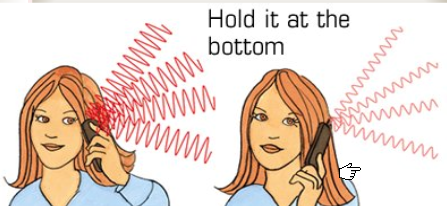
7. Hold the phone at the bottom

[2.png]

While talking on your cellphone try to hold the phone as far down as possible. If you cover large area of the phone with your hand, the phone increases its power to send and receive signals. Uncovering your phone leads to low radiation and thus low power consumption.

8. Position the Keypad towards your body

The signal is radiated from the back of a mobile phone. So, keeping the back facing your body will make the signal pass through your body. Placing the keypad towards your body will make the phone operate at lower power consumption rate.

9. Communicate Via Text Message

Using SMS for communicating instead of calling greatly increases the battery life as messaging does not use much power.

10. Avoid using phone while moving at high speed

While moving, cellphone repeatedly attempts to connect to a new relay antenna increasing its power consumption to the maximum possible level. Using the phone on the go deteriorates battery performance.

11. Get to a position where signal strength is good

https://blogger.googleusercontent.com/img/b/R29vZ2xl/AVvXsEiwMAwI36j0In4Bfg2xCksXtfGzrpoKm1BNM-1WOB3kYYDgWTWgqnl0aRs_SuJ5xmcY-HKS7z7-I6n-2IivZLJU8RDElrBtzKGaZEQ3RtE5GJ5z5OxTlJNIAvyZU13OJOYZUtyr3Ur06o4/s400/3.png

Every phone has a display noting the signal strength at the place. While making a call get yourself to a position where the signal strength is maximum. Moving towards a open window or door may increase the signal strength. Poor signal reception makes the phone operate in the maximum power and radiation mode which juices out the battery quickly.

12. Hide your Mobile

Don’t leave your mobile unattended in a public place or in your unattended vehicle. Almost half of the mobile theft cases are reported to take place are from vehicles. Follow the simple rule, hide your mobile from the thieves, they won’t steal it.

13. Know your IMEI number

Each phone has its unique IMEI number which you can see by keying *#06# into your phone. If your mobile is stolen, you can tell the IMEI number to your service provider to block the phone.

14. Turn off Bluetooth when not using it

Other than sucking the mobile battery, keeping the bluetooth on while not using it may be potentially dangerous to your mobile.

15. Update Mobile Phone Firmware

Check your handset manufacturer’s website for updates and downloads which can increase your phone’s security and stability. Get the latest version and patched with any security upgrades.

16. Get Genuine batteries

Use genuine battery from the phone manufacturer. Operating mobile phone with a cheap counterfeit battery can be dangerous.

Hope these tips comes to any help to you. If you think you know some other tips, please let us know.

`vodafone Trick For Free Gprs'
=========================
This trick has been tested on different mobiles and has been confirmed to be working.
Followng are the Settings you require to configure on your Mobile:

Account Name: Vodafone_gprs
Homepage: http://live.vodafone.in
User Name: (no need)
Pass: (no need)

Access Point Settings :-
Proxy: Enabled
Proxy Address: 10.10.1.100
Proxy Port: 9401
Data Bearer: Packet Data

Bearer Settings :-
Packet Data Access Point: portalnmms
Network type: IPV4
Authentication: normal
User Name: (no need)
Password: (no need)

*IF that happen this settings is not working then change the proxy port number to:-

Proxy Port: 9401
=====================
Default user code : 1122, 3344, 1234, 5678
Engineer mode : *#110*01#
Factory mode : *#987#
Enable COM port : *#110*01# -> Device -> Set UART -> PS Config -> UART1/115200
Restore factory settings : *#987*99#
LCD contrast : *#369#
Software version : *#800#
Software version : *#900#
Set default language : *#0000# Send
Set English language : *#0044# Send
Set English language (new firmware) : *#001# Send

IF YOU LIKE THE POST, THANK ME