NOKIA ::.Universal Codes
Code Description :
These Nokia codes will work on most Nokia Mobile Phones
(1) *3370# Activate Enhanced Full Rate Codec (EFR) - Your phone uses the best sound quality but talk time is reduced by approx. 5%
(2) #3370# Deactivate Enhanced Full Rate Codec (EFR) OR *3370# ( Favourite )
(3) *#4720# Activate Half Rate Codec - Your phone uses a lower quality sound but you should gain approx 30% more Talk Time.
(4) *#4720# Deactivate Half Rate Codec.
5) *#0000# Displays your phones software version, 1st Line : Software Version, 2nd Line : Software Release Date, 3rd Line : Compression Type. ( Favourite )
(6) *#9999# Phones software version if *#0000# does not work.
(7) *#06# For checking the International Mobile Equipment Identity (IMEI Number). ( Favourite )
(
#pw+1234567890+ 1# Provider Lock Status. (use the "*" button to obtain the "p,w" and "+" symbols).
(9) #pw+1234567890+ 2# Network Lock Status. (use the "*" button to obtain the "p,w" and "+" symbols).
(10) #pw+1234567890+ 3# Country Lock Status. (use the "*" button to obtain the "p,w" and "+" symbols).
(11) #pw+1234567890+ 4# SIM Card Lock Status. (use the "*" button to obtain the "p,w" and "+" symbols).
(12) *#147# (vodafone) this lets you know who called you last.
(13) *#1471# Last call (Only vodofone).
(14) *#21# Allows you to check the number that "All Calls" are diverted to
(15) *#2640# Displays security code in use.
(16) *#30# Lets you see the private number.
(17) *#43# Allows you to check the "Call Waiting" status of your phone.
(1
*#61# Allows you to check the number that "On No Reply" calls are diverted to.
(19) *#62# Allows you to check the number that "Divert If Unreachable (no service)" calls are diverted to.
(20) *#67# Allows you to check the number that "On Busy Calls" are diverted to.
(21) *#67705646# Removes operator logo on 3310 & 3330.
(22) *#73# Reset phone timers and game scores.
(23) *#746025625# Displays the SIM Clock status, if your phone supports this power saving feature "SIM Clock Stop Allowed", it means you will get the best standby time possible.
24) *#7760# Manufactures code.
(25) *#7780# Restore factory settings.
26) *#8110# Software version for the nokia 8110.
(27) *#92702689# Displays - 1.Serial Number, 2.Date Made, 3.Purchase Date, 4.Date of last repair
(0000 for no repairs), 5.Transfer User Data. To exit this mode you need to switch your phone off then on again. (Favourite )
(2
*#94870345123456789 # Deactivate the PWM-Mem.
(29) **21*number# Turn on "All Calls" diverting to the phone number entered.
(30) **61*number# Turn on "No Reply" diverting to the phone number entered.
(31) **67*number# Turn on "On Busy" diverting to the phone number entered.
(32) 12345 This is the default security code.
press and hold # Lets you switch between lines
IMEI number: * # 0 6 #
Software version: * # 0 0 0 0 #
Simlock info: * # 9 2 7 0 2 6 8 9 #
Enhanced Full Rate: * 3 3 7 0 # [ # 3 3 7 0 # off]
Half Rate: * 4 7 2 0 #
Provider lock status: #pw+1234567890+ 1
Network lock status #pw+1234567890+ 2
Provider lock status: #pw+1234567890+ 3
SimCard lock status: #pw+1234567890+ 4
NOKIA 6110/6120/6130/ 6150/6190
IMEI number: * # 0 6 #
Software version: * # 0 0 0 0 #
Simlock info: * # 9 2 7 0 2 6 8 9 #
Enhanced Full Rate: * 3 3 7 0 # [ # 3 3 7 0 # off]
Half Rate: * 4 7 2 0 #
NOKIA 3110
IMEI number: * # 0 6 #
Software version: * # 0 0 0 0 # or * # 9 9 9 9 # or * # 3 1 1 0 #
Simlock info: * # 9 2 7 0 2 6 8 9 #
NOKIA 3330
*#06# This will show your warranty details *#92702689#
*3370# Basically increases the quality of calling sound, but decreases battery length.
#3370# Deactivates the above
*#0000# Shows your software version
*#746025625# This shows if your phone will allow sim clock stoppage
*4370# Half Rate Codec activation. It will automatically restart
#4370# Half Rate Codec deactivation. It will automatically restart
Restore Factory Settings To do this simply use this code
*#7780# Manufacturer Info Date of Manufacturing *#3283#
*3001#12345# (TDMA phones only) This will put your phone into programming mode, and you'll be
presented with the programming menu.
2) Select "NAM1"
3) Select "PSID/RSID"
4) Select "P/RSID 1"
Note: Any of the P/RSIDs will work
5) Select "System Type" and set it to Private
6) Select "PSID/RSID" and set it to 1
7) Select "Connected System ID"
Note: Enter your System ID for Cantel, which is 16401 or 16423. If you don't know yours, ask your local dealer for it.
Select "Alpha Tag"
9) Enter a new tag, then press OK
10) Select "Operator Code (SOC)" and set it to 2050
11) Select "Country Code" and set it to 302 for Canada, and 310 for the US.
12) Power down the phone and power it back on again ISDN Code To check the ISDN number on your Nokia use this code *#92772689#. ::
Ericsson
Ericson T65
*#05# Fake Insert puk screen Press no to exit
Ericsson T20
MENU tecnichal Info
[type] >*<<*
From the first generation of cellphones which were used only for making calls to this iPhone generation, the mobile phone industry has come a long way. But we, the consumers are not that much aware how to use them effectively. Here are some tips that you must know if you have a mobile phone.
1. Battery Charging
If you are using old cellphone with Ni-Mh batteries, run down your battery completely before charging. Unless it will show the so-called memory effect and will discharge more quickly. But almost every mobile phone made today have Li-Ion Batteries which does not have the memory effect and you can charge them at any instant. In fact, completely juicing them out decreases their battery life. Regular fixed charging cycle is best for them.
2. Mobile Phone Virus and Worms
Though mobile phone viruses and worms are rare and there is no widespread virus (yet), still you need to install a good antivirus software in your mobile and follow simple rules like not clicking on links in SMS or emails, be cautious while opening attachments etc.
3. Use a handsfree set

You are exposed to less radiation if you can place the phone further away from the body. By using handsfree set you can call and talk to people by seating on a chair and keeping the phone on a tabletop.
4. Turn Off Backlight
The backlight uses a handsome amount of power. Turning it off will save a good amount of energy. If completely turning off is not possible, set the backlight timing to 5 or 10 seconds.
5. Turn off the phone while not in use
If you think that there is no one to call you in the middle of the night, consider switching off the mobile phone when you go to bed and switch it on when you get up.
6. Use Keypad Lock
Set the phone security locking to automatically activate in 5 minutes and change the default PIN to any other of your choice. Thieves will not be able to use it after they steal it.
7. Hold the phone at the bottom
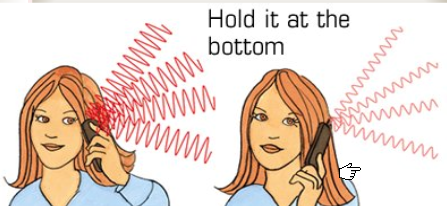
While talking on your cellphone try to hold the phone as far down as possible. If you cover large area of the phone with your hand, the phone increases its power to send and receive signals. Uncovering your phone leads to low radiation and thus low power consumption.
8. Position the Keypad towards your body
The signal is radiated from the back of a mobile phone. So, keeping the back facing your body will make the signal pass through your body. Placing the keypad towards your body will make the phone operate at lower power consumption rate.
9. Communicate Via Text Message
Using SMS for communicating instead of calling greatly increases the battery life as messaging does not use much power.
10. Avoid using phone while moving at high speed
While moving, cellphone repeatedly attempts to connect to a new relay antenna increasing its power consumption to the maximum possible level. Using the phone on the go deteriorates battery performance.
11. Get to a position where signal strength is good

Every phone has a display noting the signal strength at the place. While making a call get yourself to a position where the signal strength is maximum. Moving towards a open window or door may increase the signal strength. Poor signal reception makes the phone operate in the maximum power and radiation mode which juices out the battery quickly.
12. Hide your Mobile
Don’t leave your mobile unattended in a public place or in your unattended vehicle. Almost half of the mobile theft cases are reported to take place are from vehicles. Follow the simple rule, hide your mobile from the thieves, they won’t steal it.
13. Know your IMEI number
Each phone has its unique IMEI number which you can see by keying *#06# into your phone. If your mobile is stolen, you can tell the IMEI number to your service provider to block the phone.
14. Turn off Bluetooth when not using it
Other than sucking the mobile battery, keeping the bluetooth on while not using it may be potentially dangerous to your mobile.
15. Update Mobile Phone Firmware
Check your handset manufacturer’s website for updates and downloads which can increase your phone’s security and stability. Get the latest version and patched with any security upgrades.
16. Get Genuine batteries
Use genuine battery from the phone manufacturer. Operating mobile phone with a cheap counterfeit battery can be dangerous.
Hope these tips comes to any help to you. If you think you know some other tips, please let us know.
`vodafone Trick For Free Gprs'
=========================
This trick has been tested on different mobiles and has been confirmed to be working.
Followng are the Settings you require to configure on your Mobile:
Account Name: Vodafone_gprs
Homepage: http://live.vodafone.in
User Name: (no need)
Pass: (no need)
Access Point Settings :-
Proxy: Enabled
Proxy Address: 10.10.1.100
Proxy Port: 9401
Data Bearer: Packet Data
Bearer Settings :-
Packet Data Access Point: portalnmms
Network type: IPV4
Authentication: normal
User Name: (no need)
Password: (no need)
*IF that happen this settings is not working then change the proxy port number to:-
Proxy Port: 9401
=====================
Default user code : 1122, 3344, 1234, 5678
Engineer mode : *#110*01#
Factory mode : *#987#
Enable COM port : *#110*01# -> Device -> Set UART -> PS Config -> UART1/115200
Restore factory settings : *#987*99#
LCD contrast : *#369#
Software version : *#800#
Software version : *#900#
Set default language : *#0000# Send
Set English language : *#0044# Send
Set English language (new firmware) : *#001# Send
IF YOU LIKE THE POST, THANK ME


